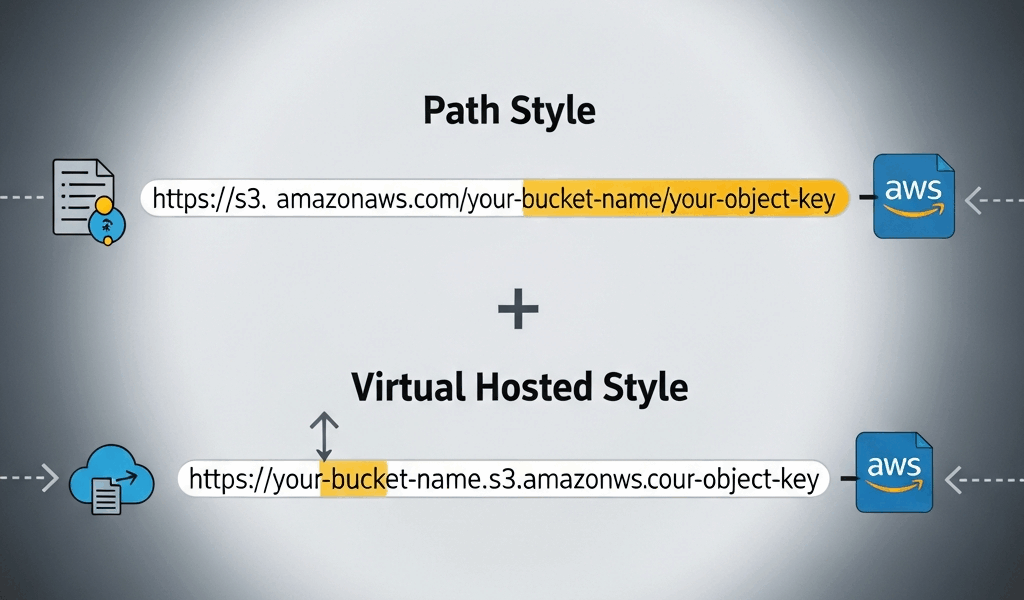
AWS S3 URL Formats Explained — Path Style vs Virtual Hosted Style
AWS S3 URL formats have gotten complicated with all the deprecation noise flying around. As someone who spent six hours debugging what I was convinced was an IAM permissions disaster — only to discover it was a URL format mismatch — I learned everything there is to know about path style vs virtual hosted the hard way. This is the reference I wish I’d had that afternoon. Structured so you can find what you need without wading through AWS documentation that reads like a compliance audit.
The Two URL Formats — Side by Side
There are exactly two. They carry the same information. The only structural difference is where the bucket name lives.
Path Style
The bucket name sits in the URL path, after the domain:
https://s3.{region}.amazonaws.com/{bucket}/{key}Real example — bucket called my-data-exports in us-east-2, file at reports/2024/january.csv:
https://s3.us-east-2.amazonaws.com/my-data-exports/reports/2024/january.csvYou’ll also run into the legacy regionless variant — https://s3.amazonaws.com/my-data-exports/reports/2024/january.csv — in older codebases. That’s path style pointing implicitly at us-east-1. Don’t use it for anything new.
Virtual Hosted Style
The bucket name becomes part of the subdomain:
https://{bucket}.s3.{region}.amazonaws.com/{key}Same file, same bucket, virtual hosted:
https://my-data-exports.s3.us-east-2.amazonaws.com/reports/2024/january.csvThat’s what AWS wants you using now. The key — the actual object path — stays identical between both formats. The bucket moves. That’s the whole structural difference. But the operational implications are real enough to be worth understanding.
The Region Note
Include the region. Both formats. Omitting it technically works sometimes, but it adds redirect latency and will eventually break on buckets created after September 2020 in non-us-east-1 regions. Always put the region in. No exceptions.
Why AWS Is Deprecating Path Style
AWS announced path-style deprecation in 2019, targeting September 2020 as the cutoff for new buckets. Buckets created before that date kept path-style support. Buckets created after September 30, 2020 don’t support path-style URLs by default.
The technical reasons are worth knowing — not just the timeline.
DNS Routing and Scale
With path style, every S3 request resolves through a handful of AWS-controlled domains like s3.us-east-1.amazonaws.com. AWS can’t do per-bucket DNS optimization there. Virtual hosted style gives each bucket its own DNS entry — my-bucket.s3.us-east-1.amazonaws.com — which lets AWS route traffic more granularly, apply DDoS mitigation per bucket, and scale independently per customer namespace. That’s what makes virtual hosted style worth caring about beyond just compliance.
TLS Certificate Implications
Path style puts every bucket under a shared AWS domain. Wildcard certificates handle that fine, but it limits options for custom SSL behavior. Virtual hosted style is what actually makes S3’s custom domain support with CloudFront work cleanly at the DNS layer.
What This Means for Your Code
If your buckets predate October 2020 — path style still works on those. AWS has been cautious about pulling the rug out. But every bucket created since then, and everything you’ll spin up going forward, requires virtual hosted style. Default to virtual hosted everywhere. Treat path style as something you reach for deliberately, not accidentally.
Don’t make my mistake. We had a Terraform module that had been running fine for two years — someone spun it up in a new account, new region, post-deprecation bucket, and the app threw access errors on day one. IAM policies were fine. Bucket policy was fine. The URL format in our config file was just two years old and nobody had touched it.
When You Still Need Path Style
Path style isn’t dead. Three real scenarios where you’ll reach for it.
Legacy Applications You Can’t Refactor
Applications built before 2019 that hardcode S3 endpoints — or rely on SDK versions old enough that virtual hosted isn’t the default — and where refactoring isn’t happening. More common in enterprise environments than people admit publicly. The answer is making sure those apps only interact with pre-October-2020 buckets and adding that constraint explicitly to your runbook before someone forgets.
S3-Compatible Storage — MinIO, Ceph, Wasabi
This is probably the most common reason developers actually hit path style in 2024. MinIO, Ceph, Wasabi, DigitalOcean Spaces, Backblaze B2 — these S3-compatible systems often default to or require path style. MinIO in particular, when self-hosted, uses path style unless you’ve gone out of your way to configure DNS for virtual hosted subdomains.
Frustrated by a MinIO setup refusing connections inside a local Docker environment, I eventually found the one-line SDK fix buried in a GitHub issue from 2021. Here it is for AWS SDK v3 in JavaScript:
const client = new S3Client({
  endpoint: "http://localhost:9000",
  forcePathStyle: true,
  region: "us-east-1",
  credentials: {
    accessKeyId: "minioadmin",
    secretAccessKey: "minioadmin",
  },
});
For AWS SDK v2 (Python/boto3), the equivalent:
s3 = boto3.client(
    's3',
    endpoint_url='http://localhost:9000',
    config=Config(s3={'addressing_style': 'path'})
)
Local Development Environments
LocalStack — the popular local AWS emulator, free tier at $0/month, pro tier starting around $35/month as of early 2025 — defaults to path style on http://localhost:4566. Same configuration as MinIO above. Set forcePathStyle: true, point the endpoint at localhost. Done.
Common URL Errors and How to Fix Them
Probably should have opened with this section, honestly — it’s what most people are actually here for.
403 Forbidden — The Format Mismatch
Your permissions are correct. The policy is fine. Still getting 403. Check whether your code is constructing a path-style URL against a post-2020 bucket. This is a format issue — not a permissions issue. AWS returns 403 instead of something more descriptive, which makes it maddening to diagnose the first time around.
Fix: Switch your SDK config or constructed URL to virtual hosted format. Verify the bucket was created after September 2020 and that it isn’t one of the grandfathered pre-deprecation buckets.
Region Mismatch — PermanentRedirect Errors
You’ll see this as an XML response with <Code>PermanentRedirect</Code> and a suggested endpoint. The bucket exists, access is fine, but you’ve got the wrong region in the URL — the bucket is in eu-west-1 and your code has us-east-1 hardcoded somewhere from a copy-paste two years ago.
Fix: Check the actual bucket region in the S3 console or run aws s3api get-bucket-location --bucket your-bucket-name. Update the endpoint region to match. Don’t rely on redirects in production — they add latency and occasionally cause SDK retry loops that are genuinely unpleasant to untangle.
Bucket Naming Restrictions for Virtual Hosted Style
Virtual hosted style has harder constraints on bucket names. The bucket name becomes a DNS subdomain label — which means:
- No uppercase letters —
MyDataBucketwon’t work as a virtual hosted subdomain - No dots in the bucket name —
my.data.bucketcreates SSL certificate validation errors because it generates a multi-level subdomain (my.data.bucket.s3.amazonaws.com) that doesn’t match AWS wildcard certs - No underscores — not valid in DNS labels
- 3 to 63 characters, must start and end with a lowercase letter or number
If your bucket name has dots, you’re essentially stuck with path style or a CloudFront distribution out front. The dots issue catches teams that named buckets after internal domain conventions — something like data.internal.company — which seemed perfectly reasonable at the time.
SSL Errors on Dotted Bucket Names
The error looks like a certificate mismatch or ERR_CERT_COMMON_NAME_INVALID. The bucket name has dots. The virtual hosted URL becomes my.dotted.bucket.s3.amazonaws.com and the wildcard cert *.s3.amazonaws.com doesn’t cover multiple subdomain levels. Use path style for these buckets — or rename them if that’s actually on the table.
Quick Reference Table
Single table. Screenshot it, bookmark it, whatever works.
| Format | URL Structure | When to Use | SDK Config Key | Example URL |
|---|---|---|---|---|
| Virtual Hosted | https://{bucket}.s3.{region}.amazonaws.com/{key} |
Default for all new AWS S3 buckets (post Sept 2020); anything on AWS proper | boto3: addressing_style: 'virtual' / SDK v3: forcePathStyle: false (default) |
https://my-bucket.s3.us-east-1.amazonaws.com/file.txt |
| Path Style | https://s3.{region}.amazonaws.com/{bucket}/{key} |
S3-compatible storage (MinIO, Ceph), LocalStack, legacy apps, dotted bucket names | boto3: addressing_style: 'path' / SDK v3: forcePathStyle: true |
https://s3.us-east-1.amazonaws.com/my-bucket/file.txt |
| Legacy Path (no region) | https://s3.amazonaws.com/{bucket}/{key} |
Don’t use — implicit us-east-1 only, deprecated | N/A — avoid | https://s3.amazonaws.com/my-bucket/file.txt |
Short version: virtual hosted for anything on real AWS infrastructure. Path style when you’re talking to something that isn’t AWS — or working around a dotted bucket name you can’t rename. Always include the region. The legacy no-region format is something to search for and remove in old codebases, not something you ever build with again.




Stay in the loop
Get the latest team aws updates delivered to your inbox.